Dashboard
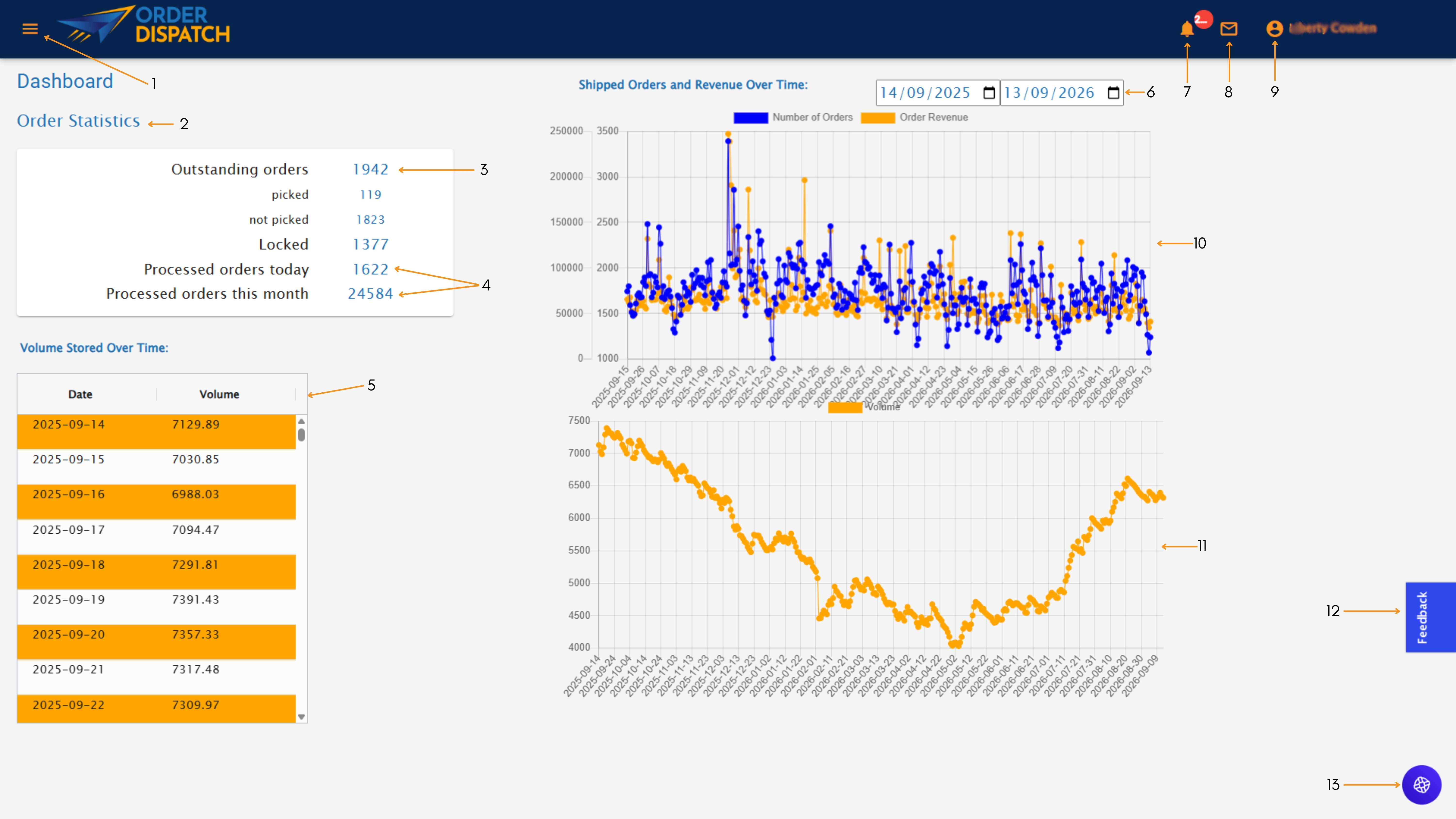
After logging in to Order Dispatch, you will be greeted by this home page. The dashboard lets you quickly view useful information like outstanding orders, picked orders, and more.
1. Navigation Menu
Access the different areas and features available within Order Dispatch. This provides a quick and easy way to move between your dashboard, orders, inventory, returns, reports, and other account tools.
2. Order Statistics
View a live summary of your current order activity. This section breaks orders down by status, including outstanding, picked, unpicked, locked, and processed, helping you to understand your fulfilment position at a glance.
3. Outstanding Orders
See the total number of orders currently awaiting completion. This figure includes orders at different stages of the fulfilment process, with further detail showing how many have or have not yet been picked.
4. Processed Orders
Here you can monitor the number of orders processed that day and throughout the current month. These figures provide a quick overview of recent fulfilment activity and make it easier to track order volumes during busy periods.
5. Stored Volume History
You can review the amount of storage space your inventory has occupied on each recorded date. The table provides a detailed breakdown, helping you to monitor how your storage requirements change over time.
6. Reporting Data Range
You can choose the start and end dates for the information displayed in the dashboard charts. Adjusting the reporting period allows you to focus on a specific campaign, trading period, season, or timeframe.
7. Notifications
Your notifications provide clear updates on important order and delivery activity. These may include details of items returned by customers, as well as tracking events you have chosen to receive alerts for, such as delayed deliveries, failed delivery attempts or parcels being returned to sender.
These alerts help you stay informed, investigate issues quickly and take any necessary action to keep your customers updated. You can manage your notification preferences to ensure you only receive updates that are relevant to your business.
8. Messaging
This contains all messages to/from couriers, Order Dispatch allows you to directly contact the courier responsible for delivering the parcel. This area helps keep relevant information together so it can be reviewed whenever needed.
9. Account Menu
Access your user profile and available account options. From here, you can review or manage your personal details, preferences, and other account-related settings.
10. Shipped Orders and Revenue
Compare the number of orders shipped against the associated order revenue over your selected period. This chart can help you identify sales patterns, periods of higher demand, and changes in order activity.
11. Stored Volume Trend
Track the volume of stock held in the warehouse has changed over time. This can help you identify seasonal changes, stock reductions, and longer-term storage patterns, supporting more informed inventory planning.
12. Feedback
Share feedback about your experience with Order Dispatch or report an issue you have encountered. Your comments can help to identify areas for improvement and support the continued development of the platform.
13. Live Chat Bot
You have access to a 24/7 assistant. With a wealth of knowledge it is able to help you with all Order Dispatch related questions any time of the day.